Is Your CRM DPDP Compliant? Zoho, Salesforce & HubSpot Users Must Check These 9 Things
Your CRM is almost certainly the largest single store of personal data your company controls. Every lead form, every imported list, every support ticket and every enrichment tool eventually deposits a record there. So when Indian teams start planning for the Digital Personal Data Protection Act, the CRM is where the gap between policy and reality shows up first. CRM DPDP compliance is not a document exercise. It is a configuration problem, and most of it sits in settings your sales operations team already owns.
The timing matters. The DPDP Rules 2025 were published on 13 November 2025 under notification G.S.R. 843(E), but the obligations that actually bite were deferred. Notice, consent, security safeguards, breach intimation, erasure and the penalty schedule all commence on 13 May 2027. In other words, you have a fixed runway rather than an emergency. Still, the work below takes longer than most teams expect, because it touches integrations you did not build.
This article walks through nine checks against your live CRM tenant. Because Zoho, Salesforce and HubSpot behave differently, each check notes where the three platforms diverge. For the wider programme view, our DPDP compliance checklist covers the obligations that sit outside the CRM.
Why CRM DPDP compliance is different from the rest of your programme
Most privacy programmes begin with a data inventory and a policy set. That approach works well for structured systems such as payroll or billing, because the fields are stable and the purposes are obvious. A CRM behaves differently. Its schema grows continuously, since anyone with admin rights can add a custom field on a Tuesday afternoon.
As a result, three problems compound quietly. First, personal data arrives through paths nobody documented, such as a chat widget or a spreadsheet import. Second, the record is copied outward to marketing automation, sales engagement and analytics tools within seconds of creation. Third, deletion in the CRM rarely propagates to those copies. Consequently, an erasure request can be marked complete while the data is still live in four other systems.
Because of this fan-out, the CRM is where obligations under Section 8 of the Act become concrete. Section 8(5) requires reasonable security safeguards. Section 8(7) requires erasure once consent is withdrawn or the purpose is served. Meanwhile Section 8(2) requires a valid contract with any processor you involve. Each of those lands squarely on your CRM stack.
What most CRM DPDP compliance advice gets wrong about data residency
Here is the correction worth making early, because a great deal of published guidance gets it backwards. The DPDP Act is not a data localisation law. Section 16 gives the Central Government power to restrict transfers to specified countries by notification. Rule 15 then permits transfer outside India, subject to requirements the Government may specify about making data available to a foreign State or its agencies. No blanket India-only storage mandate exists in the statute.
Therefore, running HubSpot out of Virginia does not breach the DPDP Act by itself. However, two caveats genuinely apply. Section 16(2) preserves any other Indian law that imposes a higher restriction, so RBI, IRDAI and sectoral directions still govern regulated entities. Additionally, a future notification could restrict named countries, and you would then need to move quickly.
Above all, residency still matters operationally. Latency, contractual terms, breach forensics and your own customer commitments all depend on where the data sits. So treat residency as a business decision with legal inputs, rather than a compliance requirement invented by a vendor pitch.
How CRM DPDP compliance actually works inside your CRM
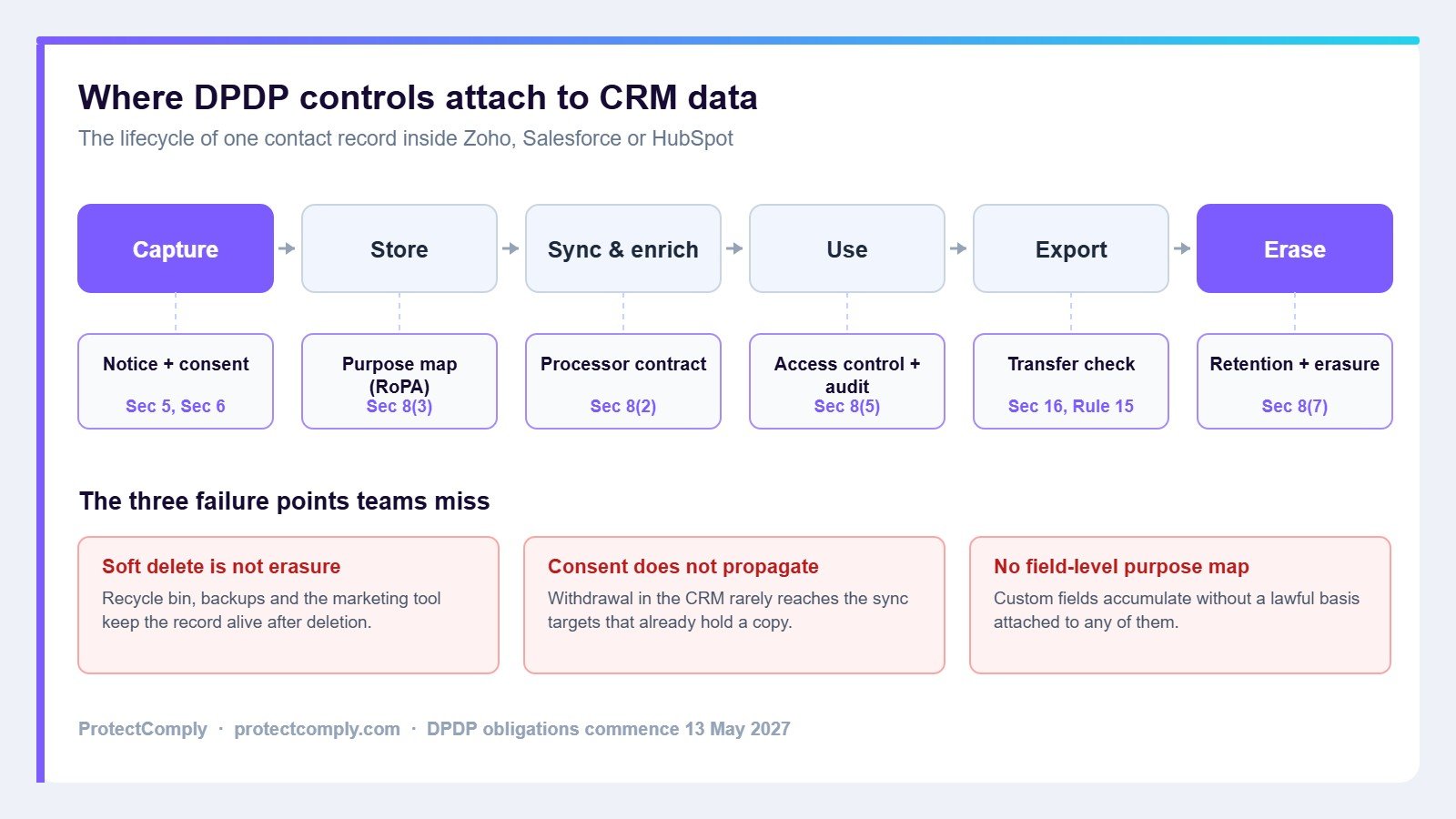
It helps to follow one record end to end. Suppose a prospect submits a demo form on your website at 10:02 on a Monday morning.
Input. The form posts to the CRM through a native tracking script or an API call. At this moment the notice under Section 5 must already have been shown, and consent under Section 6 must have been captured through a clear affirmative action. A pre-ticked box does not qualify.
Processing and storage. The CRM writes a contact record plus associated objects. Typically this includes the form submission, the page view history and the source attribution. Notably, that history is personal data too, even though nobody thinks of it as such.
Data flow. Within seconds, workflows push the record outward. For example, the contact syncs to a mailing tool, a sales engagement sequence, a data warehouse and possibly an enrichment provider that appends firmographic and contact details. Each destination becomes a processor, and each therefore needs a contract under Section 8(2).
Decision layer. Lead scoring, routing rules and automated sequences now act on the record. Since these decisions are driven by the stored fields, the lawful basis attached to those fields determines whether the automation is permitted at all.
Output and monitoring. Reports, dashboards and CSV exports distribute the data further. Meanwhile audit logs record who viewed and changed what, assuming logging is switched on and retained long enough to matter.
Erasure. Finally, withdrawal or purpose expiry triggers deletion. In practice this is the step that fails, because soft delete, recycle bins, backups and downstream copies all keep the record alive. Our guide to data retention policy under the DPDP Act goes deeper on retention schedules.
The 9 CRM DPDP compliance checks
Work through these against your live tenant rather than your documentation. Each check names the obligation it serves, so you can evidence the answer later.
Check 1: Confirm which country your CRM data is stored in
Start with the factual answer, since surprisingly few teams have it written down. Zoho operates Indian data centres in Mumbai as primary and Chennai as secondary, and the region is chosen at signup based on the country you select. Salesforce offers Hyperforce regions including India alongside the US, UK, Germany and Japan. HubSpot, by contrast, hosts customer data in the European Union, United States East, United States West, Canada and Australia, and publishes no India region.
Accordingly, if you are on HubSpot your Indian customer data sits outside India, and paid accounts can migrate between the available regions but not into India. That is lawful today. Even so, record the decision and the reasoning, because your auditor will ask.
Check 2: Capture consent as an itemised record, not a checkbox
Section 6(1) requires consent that is free, specific, informed, unconditional and unambiguous, given through a clear affirmative action. Section 6(3) adds that the request must be in plain language, available in English or a language listed in the Eighth Schedule, with contact details for the Data Protection Officer.
Practically, this means storing more than a true or false flag. You need the purpose, the timestamp, the notice version shown, the language, and the capture channel. Otherwise you cannot demonstrate what the person actually agreed to. Our explainer on the consent artefact under the DPDP Act sets out the fields that belong in that record.
Check 3: Make withdrawal as easy as consent, and make it propagate
Section 6(4) requires that withdrawing consent be comparable in ease to giving it. Furthermore, Section 6(6) requires the fiduciary to cease processing within a reasonable time, and to make its processors cease as well.
This is the check that most CRM setups fail. An unsubscribe usually stops email, yet the sales sequence, the WhatsApp tool and the ads audience keep running. Test it properly: withdraw consent on a test record, wait an hour, then look for that record in every connected system.
Check 4: Map every CRM field to a purpose in your DPDP compliance record
Section 8(3) requires accuracy and completeness where data drives decisions, while the Rules require records that show what you process and why. A CRM with 180 custom fields and no purpose map cannot produce that evidence.
Export your field list, then attach a purpose and a lawful basis to each one. Inevitably you will find fields nobody can justify, which is the point of the exercise. Our guide to records of processing activities explains how the field map rolls up into a RoPA, and data classification for DPDP covers how to tier the fields by sensitivity.
Check 5: Confirm deletion in your CRM meets the DPDP compliance standard
Section 8(7) requires erasure once consent is withdrawn, or once it is reasonable to assume the purpose is no longer served, unless another law requires retention. Deletion must therefore be real.
Check the recycle bin retention period, the backup retention window, and whether your CRM offers a permanent delete or anonymisation API. Then check the same for every downstream tool. Because backups typically cannot be surgically edited, document your backup expiry cycle as the completion point instead.
Check 6: Handle data principal requests without exporting the database
Data principals can seek access, correction, completion, updating and erasure, and the Rules set out how requests are made. Your CRM needs a defined path to answer each one within your published timeline.
Test the awkward version, not the easy one. A person who exists as a contact, a support ticket, a call recording and a marketing audience member should produce one consolidated answer. Our guide to data principal rights covers the workflow and the timelines.
Check 7: Put your CRM integrations and sub-processors under contract
Section 8(2) permits engaging a processor only under a valid contract. Meanwhile, the typical CRM has between twelve and forty connected applications, many installed by individual users.
Open the installed applications list in your CRM and reconcile it against your vendor register. Usually the two do not match. Anything holding personal data needs a contract, a security review and an entry in your records, as covered in our guide to vendor risk management under the DPDP Act.
Check 8: Prove who accessed what, because CRM DPDP compliance rests on that audit trail
Section 8(5) requires reasonable security safeguards to prevent a breach, and Section 8(6) requires intimation to the Board and to affected data principals when one occurs. Rule 7 sets out what that intimation must contain, including the nature and extent of the breach and its likely consequences.
Consequently, you need logs that can answer a forensic question months later. Verify that field-level audit history is switched on, that export events are logged, and that log retention exceeds your likely detection lag. Without this, a breach notification becomes guesswork.
Check 9: Decide how your CRM handles children and age signals
Section 9 imposes specific obligations around processing children’s personal data, and the penalty schedule places this at up to 200 crore rupees. Most B2B teams assume the question does not apply to them.
Nevertheless, check whether any intake path could capture a person under eighteen. Education, healthcare, gaming, fintech and consumer retail almost always have one. If such a path exists, you need an age signal in the CRM and a rule that governs what happens next.
Zoho, Salesforce and HubSpot compared
The table below covers the platform-level facts that shape your configuration work. Verify each against your own tenant, since editions differ considerably.
| Area | Zoho CRM | Salesforce | HubSpot |
|---|---|---|---|
| Indian data region | Yes, Mumbai primary and Chennai secondary | Yes, via Hyperforce India | No India region published |
| Region selection | Chosen at signup by country | Selected per org | Assigned by signup IP, migration available on paid tiers |
| Native privacy layer | Data Privacy section with data source, personal field tagging and processing basis | Consent objects and Privacy Center capabilities vary by edition | Consent and notification tracking tied to subscription types |
| Typical gap | Processing basis defaults to Not Applicable until configured | Consent model needs deliberate design across objects | Residency and downstream propagation |
A worked example: a D2C brand running HubSpot
Consider a Bengaluru skincare brand with 400,000 contacts. It runs HubSpot for marketing and sales, Shopify for commerce, a WhatsApp tool for order updates and a reviews platform that emails buyers after delivery.
When the team ran these nine checks, four findings emerged. Firstly, the HubSpot portal sat in the United States East region, which nobody had recorded. Secondly, marketing consent existed, yet the WhatsApp tool held an independent opt-in list that no withdrawal ever touched. Thirdly, 61 custom properties had accumulated, of which 22 had no owner and no stated purpose. Lastly, deleted contacts remained recoverable for 90 days and stayed indefinitely in the reviews platform.
None of those findings required new software to discover. Rather, they required someone to open the settings and follow the record. The remediation, however, took eleven weeks, mostly because the WhatsApp vendor needed a contract and an API change before withdrawal could propagate.
How we measure success in CRM DPDP compliance
Since the obligations are not yet in force, no organisation can claim a compliance track record under the Act. Consequently, treat the following as an evaluation framework rather than a performance claim. These are the measures we use with customers to judge whether CRM work is genuinely finished.
| Measure | What good looks like |
|---|---|
| Field coverage | Every CRM field carries a purpose and a lawful basis, with no unclassified fields remaining |
| Withdrawal propagation | Consent withdrawal reaches every connected system, verified by test record rather than by assumption |
| Request turnaround | Access and erasure requests answered within your published timeline, consistently and with evidence |
| Erasure completeness | Deleted records absent from primary storage, recycle bin, integrations and expired backups |
| Processor coverage | Every connected application appears in the vendor register with a current contract |
| Forensic readiness | Audit logs can reconstruct access and export activity across your full detection window |
ProtectComply compared with CRM-native privacy tools
Three approaches are common, and each suits a different situation. Native CRM features handle the single-platform case reasonably well. Spreadsheets handle a very small estate. A dedicated platform earns its place once the data spans several systems.
| Criterion | CRM-native features | Spreadsheet tracking | ProtectComply |
|---|---|---|---|
| Scope | One platform only | Whatever someone remembers | CRM plus other connected systems |
| Purpose mapping | Partial, varies by edition | Manual and quickly stale | Field-level mapping into a RoPA |
| Withdrawal propagation | Within the platform | Not automated | Tracked across registered processors |
| Evidence | Platform logs | Version history at best | Retained records for each obligation |
| Effort to maintain | Low, but narrow | High and error prone | Setup effort, then ongoing review |
To be clear, a platform does not replace native CRM configuration. You still have to do checks one through nine inside Zoho, Salesforce or HubSpot. What a platform adds is the layer above, where obligations, evidence and processors are tracked together. For a broader market view, see our comparison of the best DPDP platforms in India.
Pros and cons of a dedicated compliance platform
Where it helps. A dedicated platform keeps purpose maps and RoPA entries current as your CRM schema changes. Moreover, it holds the evidence trail in one place, which matters when a regulator or an enterprise customer asks. It also tracks processors across systems, so the CRM integration list stops being a separate spreadsheet. Finally, it makes repeat assessments cheaper, since the baseline already exists.
Where it does not. A platform cannot configure your CRM for you. Consequently, if consent is captured badly at the form, no downstream tool will fix that. Implementation also takes real effort, typically several weeks of discovery before the value shows. Furthermore, a very small business running one system may find native features and a careful spreadsheet sufficient for now. Honest advice: if your entire personal data estate is one Zoho tenant with three integrations, start there instead.
Frequently asked questions
Does CRM DPDP compliance require storing data in India?
No. The DPDP Act contains no general localisation mandate. Section 16 lets the Central Government restrict transfers to notified countries, and Rule 15 permits transfer subject to conditions the Government may specify. However, Section 16(2) preserves stricter sectoral laws, so RBI or IRDAI rules may still require Indian storage for regulated entities.
Who is responsible for CRM DPDP compliance, us or the CRM vendor?
You are. As the data fiduciary you determine the purpose and means of processing, so the obligations rest with you. Your CRM vendor is typically a data processor, which you may engage only under a valid contract as required by Section 8(2). The vendor provides capability, while you remain accountable.
Is HubSpot non-compliant because it has no India data centre?
Not by itself. HubSpot hosts data in the European Union, United States East and West, Canada and Australia, and cross-border processing is permitted under the current framework. That said, you should record the transfer, ensure your contract covers it, and check whether sectoral regulation applies to your industry.
When do these obligations actually start?
Notice, consent, security safeguards, breach intimation, erasure and the penalty schedule commence on 13 May 2027, computed from the 13 November 2025 publication. Consent manager registration provisions commence earlier, on 13 November 2026. Our DPDP Rules 2025 timeline lists every date.
What are the penalties if we get this wrong?
The Schedule sets a maximum of 250 crore rupees for failing to take reasonable security safeguards, and up to 200 crore rupees each for breach intimation failures and for children’s data obligations. Other contraventions reach 50 crore rupees. Details sit in our guide to DPDP Act penalties.
How long does a CRM privacy clean-up usually take?
Discovery takes one to two weeks for a mid-sized tenant. Remediation, however, depends almost entirely on your integrations. Teams with a handful of connected tools finish within a month, whereas estates with WhatsApp, enrichment and analytics vendors commonly take two to three months because contracts and API changes are involved.
Do we need a consent management platform as well?
Possibly, especially if you collect consent across a website, an app and offline channels. A CRM records consent adequately for its own processing, yet it rarely serves as the system of record across channels. Our review of consent management platforms in India covers when a separate layer is worthwhile.
Where to start on CRM DPDP compliance
Begin with check one and check five this week, because both produce answers within an hour and both tend to surprise people. Then run the field export for check four, since it reveals the true size of the task. After that, the sequencing follows naturally from what you find.
If you would rather not assemble the evidence layer yourself, ProtectComply maps your CRM fields to purposes, builds the RoPA, tracks your processors and keeps the records an audit will ask for. You can talk to our team about a CRM-focused assessment, or read how the platform works on our how it works page. For the underlying law, our DPDP Act 2023 explainer is the place to begin.
Related reading
- Data discovery for DPDP compliance
- Records of processing activities (RoPA)
- Vendor risk management under the DPDP Act
- Data principal rights: a practical guide
- The full DPDP compliance checklist
Sources for the platform facts above: Zoho data centre locations, Salesforce Hyperforce regions and HubSpot data centres. Reviewed by Dinkar Singh, Chief Data Privacy Officer and Co-Founder, ProtectComply.