DPDP Automation Integrations: How to Connect Your CRM, HRMS and Messaging Stack
Short answer: DPDP automation integrations are the connections that let your consent, withdrawal, rights-request and breach workflows reach the systems where personal data actually lives. Those systems are usually your CRM, HRMS, marketing and messaging tools, data warehouse and support desk. Without these integrations, a compliance platform records a decision, but your other systems keep processing as before. With them, a withdrawal or erasure request flows out to every system and to every Data Processor that must act on it.
Most buyers compare compliance tools on features. However, the harder question is how those features reach the rest of your stack. This guide explains how DPDP automation integrations work, which systems to connect first, what the law actually requires, and how to test an integration before you trust it. For the wider buying decision, start with our guide to DPDP compliance automation and come back here for the integration layer.
What are DPDP automation integrations?
DPDP automation integrations are the links between your compliance platform and your business systems. They carry four kinds of events. First, consent given or withdrawn. Second, rights requests such as access, correction and erasure. Third, retention and erasure instructions. Fourth, security incidents that may become a personal data breach.
Each event must reach two places. It must reach your own systems, and it must reach your Data Processors. The DPDP Act is explicit on the second point. Under Section 6(6), after a withdrawal you must cease processing within a reasonable time and cause your Data Processors to cease as well. Similarly, Section 8(7)(b) requires you to make your processors erase data that you shared with them.
Why DPDP automation integrations matter more than features
A consent record that never reaches your email tool does not stop the next campaign. In the same way, an erasure request that stops at the CRM leaves copies in the data warehouse, the ticketing tool and a vendor’s backup. For this reason, integration coverage is often a better measure of real compliance than the feature list.
The law also sets clocks that manual processes struggle to meet. Rule 7 of the DPDP Rules, 2025 requires a detailed breach report to the Data Protection Board within 72 hours of becoming aware of a breach. Rule 14 sets a maximum of ninety days to resolve grievances. Meanwhile, Rule 6 requires logs to be kept for at least one year. In practice, DPDP automation integrations are how most organisations meet these clocks with evidence.
How DPDP automation integrations work
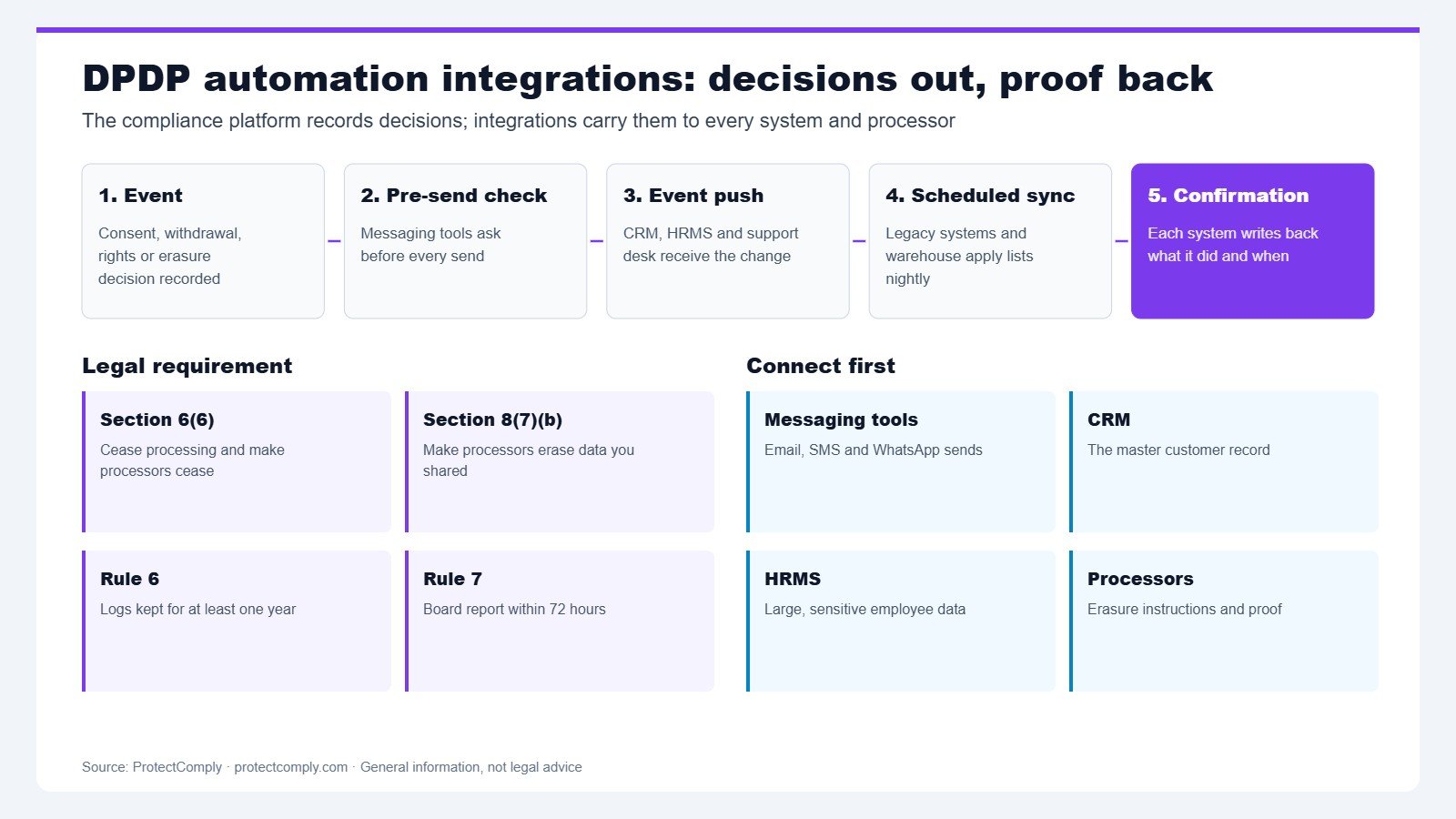
Under the hood, most DPDP automation integrations follow one of three patterns:
- Pre-send check. Before a campaign or message goes out, the sending tool asks the compliance platform whether consent is active for that person and purpose.
- Event push. When consent changes or a rights request is approved, the platform pushes an event to each connected system.
- Scheduled sync. For older systems without live connections, a regular job applies suppression lists and erasure lists.
Each pattern should return a confirmation. The confirmation proves that the target system acted, and when. Without it, you only have evidence that you asked. Therefore, design every connection to write back a result.
A practical example
Consider a D2C retailer with a CRM, a marketing email tool, a WhatsApp provider and a data warehouse. A customer withdraws marketing consent on the preference centre. First, the platform updates her consent record. Next, it pushes a withdrawal event to the CRM and the email tool. Then the WhatsApp provider’s pre-send check starts returning “blocked” for marketing. Finally, the nightly warehouse job adds her ID to the marketing suppression table.
Each system writes back a confirmation with a timestamp. As a result, the retailer can later show when each system stopped processing. That evidence matters, because Section 6(10) puts the burden of proving consent on the Data Fiduciary.
Which systems to connect first
You rarely need every connection on day one. Instead, start where the most personal data flows and where the risk of acting on stale consent is highest.
- Customer-facing messaging tools. Email, SMS and WhatsApp send the most consent-dependent processing.
- CRM. It is usually the master record for customers and leads.
- HRMS. Employee data is large and sensitive. See our guide to DPDP compliance for employee data.
- Support desk and call recording. Tickets and transcripts often hold more data than expected.
- Data warehouse and analytics. Copies accumulate here and are easy to forget.
- Processors and vendors. Every vendor in your processor register needs a way to receive erasure instructions.
A clean record of processing activities makes this list easier to build, because it shows where each category of data goes.
Comparing approaches to DPDP automation integrations
| Approach | Strength | Weakness |
|---|---|---|
| Manual tickets and spreadsheets | No build effort | Slow and hard to prove |
| Point-to-point custom scripts | Fits your stack exactly | Breaks when a system changes |
| Platform with connectors and events | Central record plus confirmations | Needs set-up per system |
For most mid-sized organisations, a platform with a central consent record and event-based DPDP automation integrations gives the best balance. However, keep a manual fallback for systems that cannot connect. Document that fallback, so auditors can see how it works.
Pros and cons of DPDP automation integrations
Pros:
- Withdrawals and erasures reach every system, not just one.
- Confirmations create evidence for the burden of proof.
- Clocks for grievances and breaches become easier to meet.
Cons:
- Each system needs set-up and testing.
- Older systems may only support scheduled syncs.
- Integrations need an owner, or they quietly break after upgrades.
How to test DPDP automation integrations before go-live
Do not trust an integration until you have tested it with real events. We suggest these checks for each connected system:
- Withdrawal test. Withdraw consent for a test profile. Then confirm the system stops processing and writes back a result.
- Erasure test. Approve an erasure request. Afterwards, search the system and its backups for the test record.
- Processor test. Send an erasure instruction to a vendor. Then ask for written confirmation.
- Failure test. Switch a connection off. Check that the platform raises an alert rather than failing silently.
- Log test. Confirm that each event is logged and kept for at least one year, in line with Rule 6.
What to put in contracts for DPDP automation integrations
Technology only works if vendors agree to act on the events you send. Therefore, add clear clauses to each processor contract. Section 8(2) already requires a valid contract, so this is the natural place for them.
- Event handling: the vendor must act on withdrawal and erasure events within an agreed time.
- Confirmation: the vendor must confirm each action, in writing or through the integration.
- Backups: the contract should say how and when backups are purged after erasure.
- Incident notice: the vendor must tell you about incidents fast enough for your 72-hour Board report under Rule 7.
- Logs: the vendor must keep and share relevant logs for at least one year.
In addition, review these clauses when a vendor changes its product or hosting. Otherwise, an upgrade can quietly break DPDP automation integrations that worked last quarter.
Common mistakes
- One-way connections. Events go out, but nothing confirms they were applied.
- Forgetting processors. Internal systems stop, but vendors keep processing.
- Ignoring the warehouse. Analytics copies survive every erasure.
- No owner. Nobody notices when an integration breaks after an upgrade.
- Treating the platform as the whole answer. Integrations carry decisions. However, your purposes and policies still decide what is lawful.
How we measure success
These are the indicators we suggest for DPDP automation integrations. We do not publish benchmark numbers, because they vary by stack and sector.
- Coverage: the share of systems in your RoPA that receive consent and erasure events.
- Confirmation rate: the share of events with a written-back confirmation.
- Propagation time: the time from a withdrawal to the last system confirming it.
- Processor response: the share of vendor erasure instructions confirmed in writing.
- Silent failures: the number of broken connections found by tests rather than by alerts.
Frequently asked questions
Does the DPDP Act require automation?
No. The Act does not require any specific tool. However, it requires you to cease processing after withdrawal, make processors cease, and prove consent. For most organisations, DPDP automation integrations are the practical way to do that.
Which system should we integrate first?
Start with the tools that send messages to customers, then the CRM. These carry the most consent-dependent processing.
What if a legacy system has no API?
Use a scheduled sync with suppression and erasure lists. Document the process, and keep logs of each run.
Do integrations need to reach our vendors?
Yes. Sections 6(6) and 8(7)(b) require you to make your Data Processors stop processing and erase data where applicable.
How long should we keep integration logs?
Rule 6 of the DPDP Rules requires logs to be kept for at least one year. Sector rules may require longer.
When do these obligations apply?
The core consent, security, breach and rights obligations commence on 13 May 2027, eighteen months after the DPDP Rules were notified.
Summary and next step
In short, DPDP automation integrations turn compliance decisions into action across your stack. Connect messaging tools and the CRM first, require a confirmation for every event, reach your processors, and test before you trust. Then track coverage and confirmation rates over time.
ProtectComply provides a central consent record, an embeddable consent widget, a hosted preference centre, Consent-as-a-Service, a public rights portal, a breach lifecycle and a RoPA with a processor catalogue. See how the features fit together, explore the product modules, or talk to the team about your stack.
Published by Jupinder Singh Bedi, CEO and Co-Founder, ProtectComply. SEO: Yatin Chaudhary. Legal references: Digital Personal Data Protection Act, 2023, Sections 6(6), 6(10) and 8(7); Digital Personal Data Protection Rules, 2025, Rules 6, 7 and 14. This article is general information, not legal advice.